Free tool · open source · v0.1.0
Screaming Toad
A free, open-source SEO crawler for Windows and Mac.
Crawl a site the way search engines do and get every broken link, redirect chain, duplicate title, missing tag and structured-data error in one place. No licence key, no account, and no 500-URL cap.
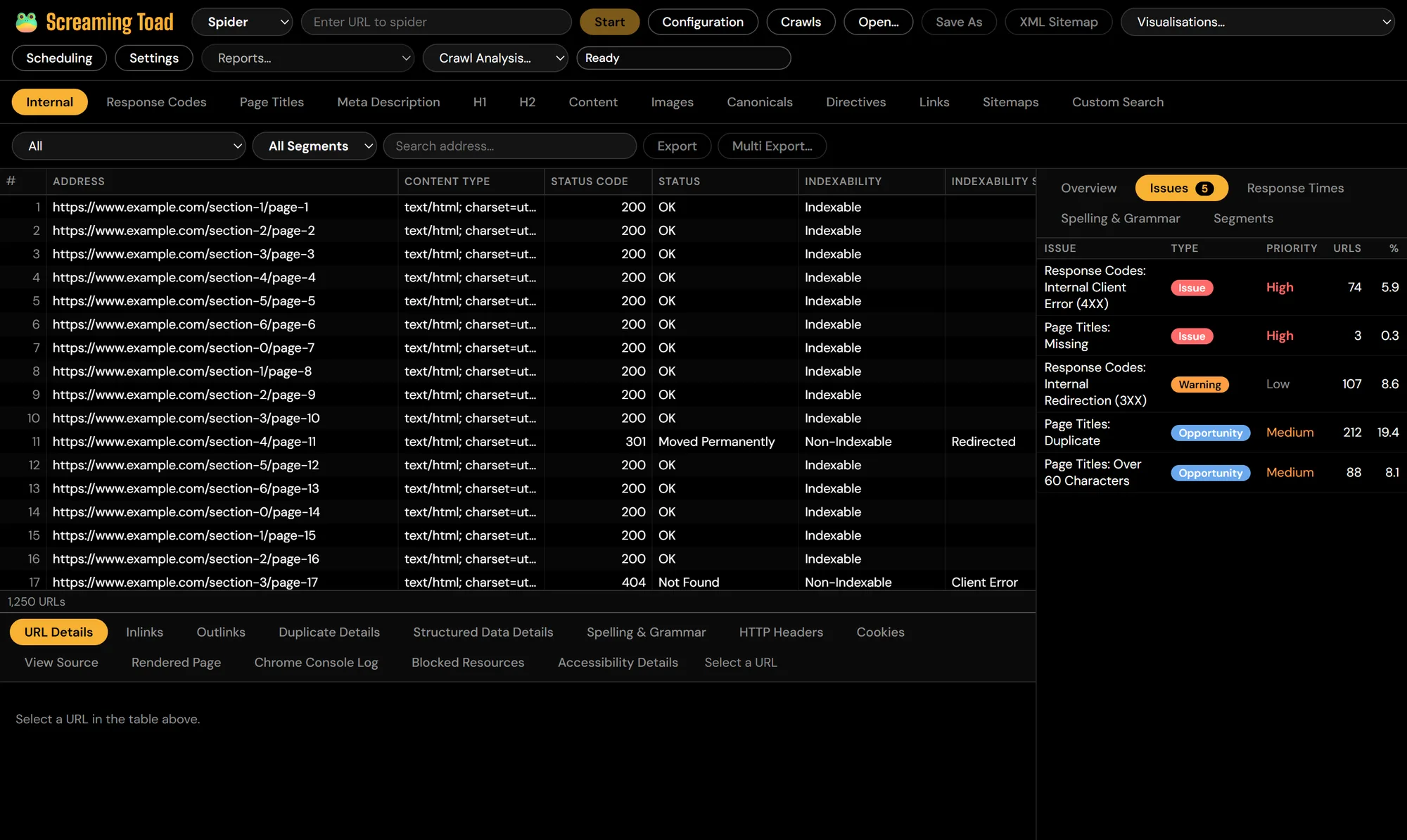
What it checks
31 tabs and more than 300 filters, plus JavaScript rendering, accessibility audits and an MCP server for AI assistants. Each crawl is saved as one file you can reopen, compare or share.
Crawl like a search engine
- Spider mode, or List mode for a pasted or uploaded set of URLs
- robots.txt respected, ignored, or ignored and reported, with the matching line shown
- Include and exclude rules, URL rewriting, depth and URL limits, crawl speed
- Custom user-agent and headers, login, proxy and pause, resume or stop
On-page SEO
- Titles and meta descriptions with character and pixel widths
- H1 and H2, canonicals (including chains), meta robots and X-Robots-Tag
- Hreflang return links and pagination errors
- Response codes, redirect chains and loops, broken links, images missing alt text
Content
- Near-duplicate pages, found with MinHash at a threshold you set
- Spelling in 31 languages, grammar, readability, word count and text ratio
- Custom search (text or regex) and custom extraction (CSS, XPath or regex)
- Text from PDFs
JavaScript rendering
- Renders pages in the Chrome or Edge already on your computer
- Original-versus-rendered comparison across 16 filters
- Screenshots, rendered source, console errors and device presets including Googlebot
- Accessibility audits with axe-core
Structured data
- JSON-LD, Microdata and RDFa
- Schema.org validation and parse errors
- Google rich-result checks for 17 types, including Product, Article, FAQPage and Event
Reports and exports
- 31 tabs and 300+ filters, each tagged Issue, Warning or Opportunity with a priority
- 20+ reports and bulk exports to CSV or Excel
- XML and image sitemaps generated from the crawl
- Compare two crawls, segments, and crawl and site-structure diagrams
Data you already have
- PageSpeed Insights, Search Console with URL Inspection, and GA4
- Ahrefs, Majestic and Moz link metrics
- AI prompts per page, and built-in embeddings that run on your CPU with no API key
- API keys stay in your operating system’s credential store
Automation
- Scheduled crawls run by Windows Task Scheduler, launchd or cron
- The toad command-line tool, included with the app
- A read-only MCP server with 12 tools for Claude, Cursor and other AI assistants
- An email when a crawl finishes
Installing it
Windows 10 and 11
Run the installer. These builds are not code-signed yet, so SmartScreen may say it protected your PC: choose More info, then Run anyway.
macOS (Apple Silicon and Intel)
Open the .dmg and drag Screaming Toad into Applications. The first time, right-click it and choose Open, then Open again.
JavaScript rendering
Uses Chrome, Edge or Chromium if one is installed. Nothing else to set up.
From the command line
The toad tool ships inside the app (next to the app on Windows) and runs the same crawler, so you can script audits or run them in CI.
# Crawl a site and export its 4XX errors
toad crawl https://example.com -o example.toad \
  --export-tabs "Response Codes:Internal Client Error (4XX)"

# List what's wrong, by priority
toad issues example.toad

# Every redirect chain, hop by hop
toad report example.toad "Redirect Chains" --out chains.csv

# What changed since last month's crawl
toad compare new.toad old.toad
Screaming Toad — common questions
Licence, installation, JavaScript rendering and where your data goes.
Yes. It is open source under the MIT or Apache-2.0 licence, with no licence key, no account and no 500-URL cap. Crawls are limited only by your computer: the default limit is 5 million URLs, and you can change it.
No. Screaming Toad is an independent open-source project built by Wrenda. It follows the workflow SEOs know from desktop crawlers such as the Screaming Frog SEO Spider, but it shares no code with it and is not affiliated with or endorsed by Screaming Frog Ltd.
These first builds are not code-signed yet. On Windows, SmartScreen may say it protected your PC: choose More info, then Run anyway. On a Mac, right-click the app in Applications, choose Open, then Open again. You only need to do this once. You can check the download against the published SHA-256 checksums first.
Yes. Turn on JavaScript rendering and Screaming Toad renders each page in the Chrome, Edge or Chromium already installed on your computer, then compares the original HTML with the rendered page so you can see what only appears after JavaScript runs.
It stays on your computer. Each crawl is saved as a single .toad file (plain SQLite) that you can reopen, compare or share, and nothing is sent anywhere except the sites you crawl and the APIs you switch on. Data from Google, PageSpeed, Ahrefs, Majestic, Moz or an AI provider is only fetched when you add your own key, and keys are kept in your operating system’s credential store.
Not as an installer yet. The code builds and its tests run on Linux, so you can build it from source on GitHub; Windows and macOS installers are published with each release.
A crawler shows what search engines and AI crawlers can reach on your site. Wrenda works on the next step: what AI crawlers actually receive, and whether AI answers cite you. If the crawl turns up JavaScript pages that bots see as empty, Wrenda pre-renders them.
The crawl shows what bots can reach. Wrenda changes what they get.
Pre-rendering for search engines, enriched pages for AI crawlers, and tracking of whether ChatGPT, Gemini and Google’s AI answers cite you. 14 days free, no card.